 Purpose
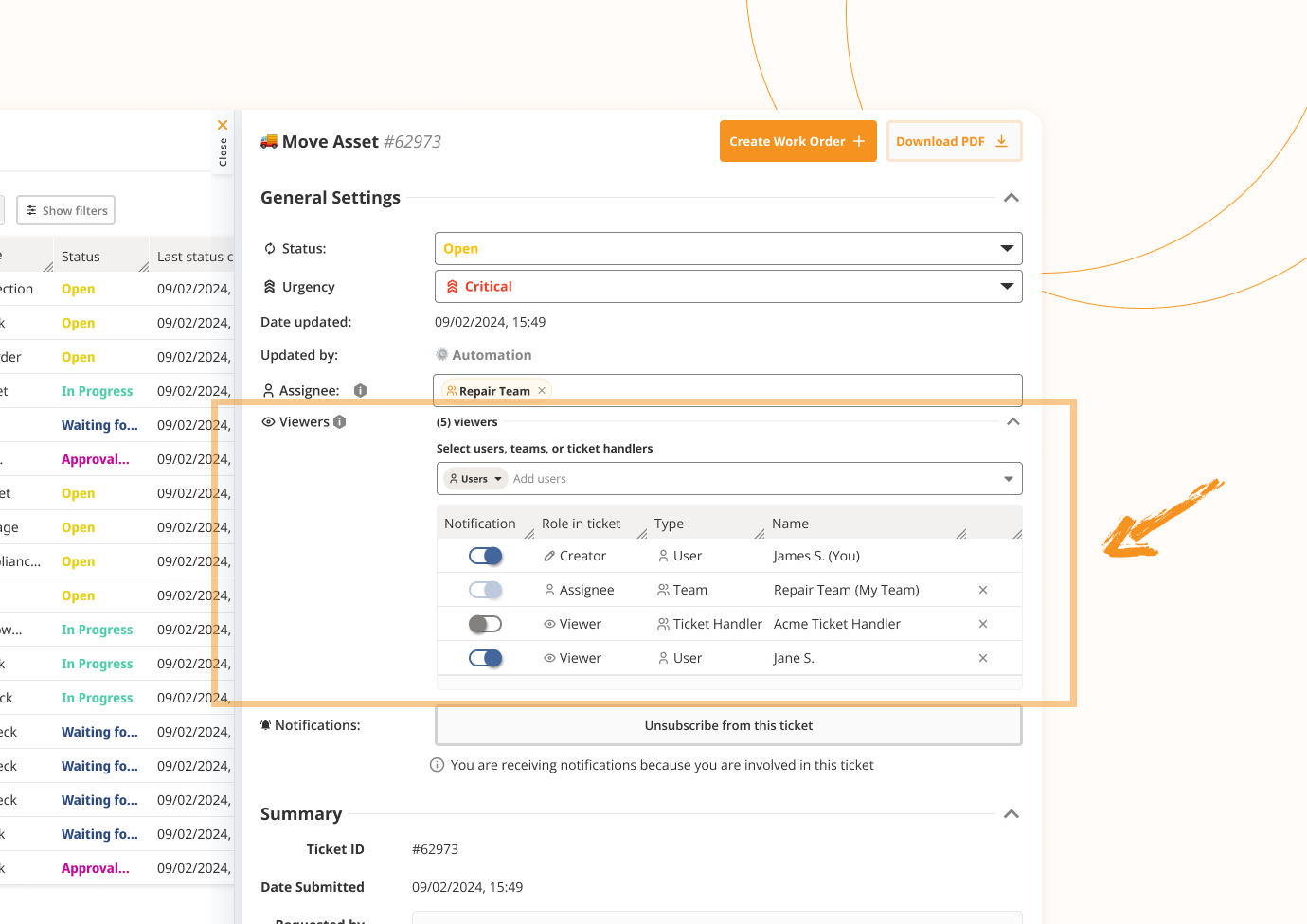
The "Viewers" feature allows for explicit management of:
Who can view and interact with tickets
Who receives notifications about ticket updates
It clarifies the involvement of different entities in a ticket by showing their specific roles, such as:
Assignee
Viewer (previously Follower)
Creator
 Key Changes from "Followers" to "Viewers"
The "Followers" field has been renamed to "Viewers".
This change has been applied across the system, including:
Web interface (WEB)
Emails, specifically in the following templates:
“Ticket you are following has …” → now reads “Ticket you are viewing has …”
“You were added as a follower to a ticket.” → now reflects being added as a viewer
Ticket details
Ticket activity logs
Push notifications
 Who Can Be Selected as Viewers?
The following entities can be selected as ticket viewers:
Site Managers
The site manager/s of the asset/s involved in the ticket
Teams
A team can include multiple individuals (Users or Emails).
Users
Individual ToolSense users.
Emails
Specific email addresses.
Groups
Can be added via a dropdown menu.
The list of groups shown will follow current group visibility logic, showing all groups below the user's context.
If a group is added, all members of that group will have visibility on the ticket.
 Notification toggles are disabled for Groups.
 Management of Viewers
Each selected Viewer (Site Manager, Team, User, Email, Group) is shown as a separate line in the viewer list. Removing Entities
Only users that have access to the ticket that has admin role in the platform and the ticket creator can remove any entity from the viewers list.
Standard Users who have access to the ticket can:
Remove themselves
Remove entities they added
 The ticket creator cannot be removed from the viewers list.
When removing an entity, a confirmation message is shown before finalization.
All actions (adds/removes) are recorded in the ticket’s activity logs

 Ticket-Related Notifications & UI Toggles
Ticket-related notifications (Email/Push) are controlled via toggles in the UI.
Anyone who can see the ticket can manage these toggles for the viewers.
 Unsubscribe from this ticket
When a user clicks "Unsubscribe from this ticket", they will:
Stop receiving all ticket notifications for their individual account regardless if they are a viewer and their notification toggle is enabled
Stop receiving notifications for any team or handler roles they’re part of on that ticket, the notification toggle is enabled for the team or handlers they’re part of
 Conditions to Receive Ticket-Related Notifications
A user will receive email or push notifications only if all the following conditions are met:
At least one of the notification toggles (Email or Push) is ON in their User Settings
The user has not clicked “Unsubscribe” on the specific ticket
The Feature Flag ticketEmailNotificationsDisabled is set to false
TicketPushNotificationsDisabled is set to false
 Specific Cases Regarding Notifications
 Case 1: Notification toggle inconsistency
If the Notification toggle is OFF at the Ticket Handler level, but ON at the Ticket level,
➤ Notifications will NOT be sent to that specific user.
 Fix: The user/team must be explicitly added as a Ticket viewer and the toggle turned ON at the Ticket level.
Case 2: Toggle is ON, but no notifications are sentIf a user’s toggle is ON but notifications are not being sent, it’s likely they have unsubscribed from the ticket.
Case 3: Internal Ticket Comments made by OEMEmail/Push Notifications for Assignees/Viewers from OEM groups:
If any Ticket Assignees or Viewers are from an OEM group, and the relevant Feature Flag ( hideInternalComments) is false they should receive notifications as per current system behavior.
 If the Feature Flag is true, they should not receive notifications.
If the Assignees or Viewers are from a Customer group, they should not receive notifications about internal OEM comments.
Email subject:"A ticket you’re assigned to in ToolSense has a new comment (#ticketID)"
➤ This and the push notification depend on the above logic.
Summary: A user will NOT receive internal comment notifications if:
They are not from the OEM group
They are from the OEM group, but the hideInternalComments feature flag is true for them
 Webhooks on Tickets
Current group visibility behavior should not change, as this is essential for webhook integrations.
Webhooks are sometimes linked to root groups, not just customer groups.
Keeping group visibility intact allows root-level webhook integrations to still work correctly.
