For a lot of ToolSense users, this was particularly relevant as support often needed to add assets like Control units and Drill Heads after the initial ticket creation with a single asset. Furthermore, assets created after ticket creation could not be linked. This new feature also offers a convenience by eliminating the need to recreate tickets for incorrect asset selections.
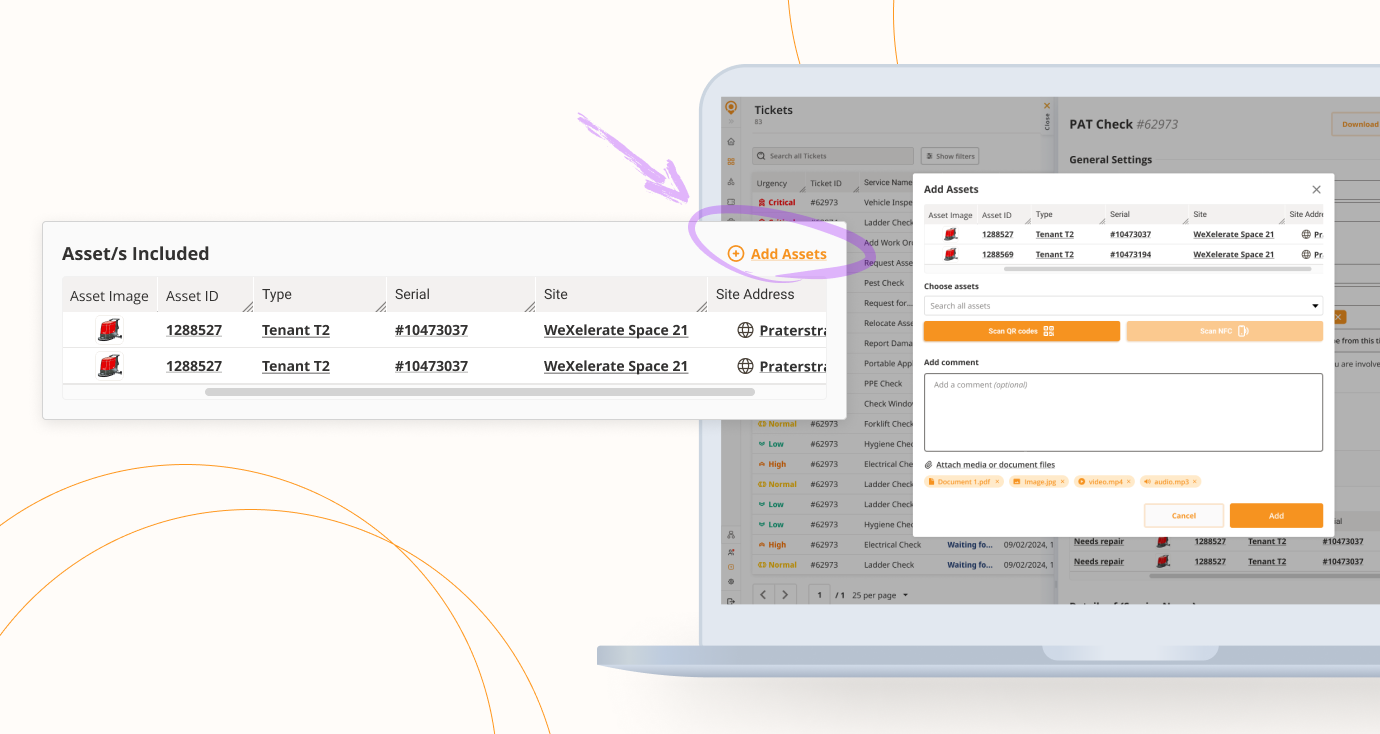
With this update, it is now possible to add or remove assets and sites directly within the ticket details.

 Adding and Removing Assets/Sites
Users can add multiple Assets/Sites per Asset/Site selector, provided that selector does not have automation assigned.
➤ The interface includes an "Add Assets" / “Add Sites” button within the ticket view.
Each added Asset/Site can be deleted separately per selector, again only if no automation is assigned.
 Ticket Logging and Events
All additions and removals of assets and sites are recorded for transparency and auditability

When an asset is added:UserName added asset (asset ID, type, serial, site) on [date], [time] + Comment, IF added
When an asset is deleted:UserName deleted asset (asset ID, type, serial, site) on [date], [time] + Comment, IF added
When a site is added:UserName added site (site ID, name, address) on [date], [time] + Comment, IF added
When a site is deleted:UserName deleted site (site ID, name/address) on [date], [time] + Comment, IF added
 These actions also appear as ticket events on the respective Asset's or Site's History tab, detailing who made the change and why.
 If an Asset/Site is removed, the Ticket event on that Asset/Site will be closed and moved to History.
 Adding an Asset/Site will create a new Ticket event in its history tab.
Ticket OutputChanges to assets and sites within a ticket are reflected in various outputs:
 Ticket PDF will show added or removed Assets/Sites
 Ticket Email will also reflect these changes
 No specific email notifications will be triggered just because of these changes
 Important Considerations for Automated Tickets
The ability to change Assets/Sites is implemented at the selector level, not the overall ticket level.
 Selectors with automation assigned have restrictions:
Asset/Site selectors that are part of automated processes (JotForms + Procedures) do not support changes. This includes:
 Check tickets
 Site moving automation tickets
 BLE assignment tickets
 Meter reading tickets
Asset availability tickets
 Assignee tickets (if a Suggested Service Partner is assigned)
However, if only Status and/or Urgency automation is applied, the feature remains available.
 In automation tickets where the feature is active (via feature flag), users will see:
For assets:"Adding or removing assets for automation ticket is not possible, as the system does not revert automatic tickets. Please make all the changes manually if needed."
For sites:"Adding or removing sites for automation ticket is not possible, as the system does not revert automatic tickets. Please make all the changes manually if needed."
An acceptable exception: if selectors were initially required, a user added an Asset/Site, and then this feature is used to remove it.
 Feature Activation
This feature is controlled by a feature flag: disableTicketItemsChange
Default setting: False → Feature is enabled
It is available for all tickets if the flag is active
To deactivate this feature for an organisation, please contact the Customer Success Management (CSM) team
SummaryThis update makes ticket management smoother by allowing you to change associated assets and sites without needing to cancel or recreate tickets. Logging and output updates provide visibility, while automation-related restrictions help keep processes consistent.
