
To enable this function for a specific check, please follow these steps:
Navigate to Rules in the main menu.
Select the desired Check from the list.
In the edit window, locate the checkbox: "Unauthorized user can complete check on QR code landing".
Enable this option.
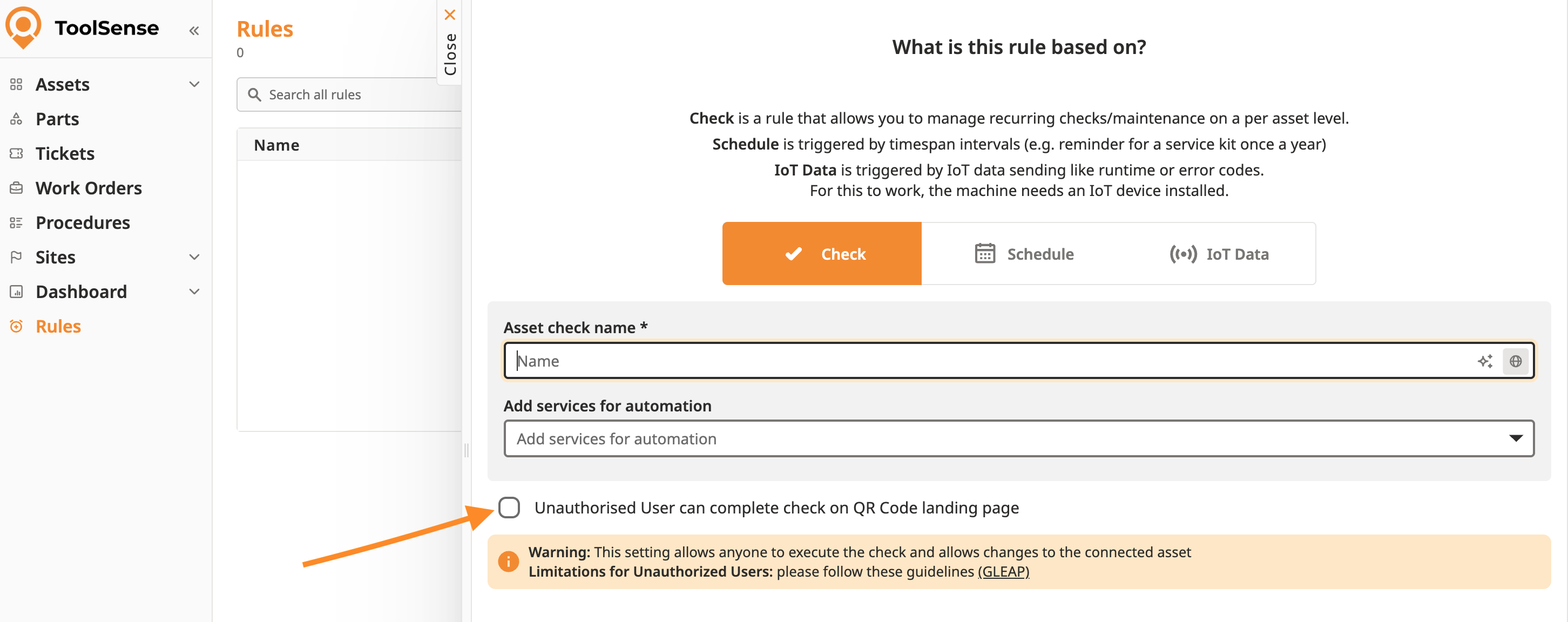
To successfully complete the check without a logged-in ToolSense User, the attached Services and their Automations must be configured correctly. Otherwise, the process may fail when saving.
Please review the Services added to this check for the following configurations:
Move Asset Automation: Must not be added to the Service.
Asset Availability Automation: May be used, but must not contain an additional asset selector.
Assignee Automation:
Should ideally be set to "Always assign to" at the Service level.
If "Suggested Service Partner" is selected: The Asset must strictly have a "Suggested Service Partner" defined at the Asset Type level. If this is missing, the assignment will fail.
Since the check is performed without a ToolSense User, standard access controls do not apply. Please be aware of the following implications:
Open Access: Anyone who can physically scan the QR code is technically capable of performing the check. There is no verification of authority.
Data Manipulation: Persons without a ToolSense User account can change the status of the asset (e.g., setting a machine to "Broken"), provided the automation allows for it.
Lack of Traceability: It is not possible to trace who performed the check. The entry in the history log will not show a specific ToolSense User, but rather a generic "Unauthorized User.
