Here are a couple of things to check in case you're experiencing issues with IoT data.
If your IoT module was working fine but suddenly stopped sending data, it is always a good idea to try to figure out what has changed compared when it was still working.
If so, consider if the machine has been taken underground or someplace where the signal might be suboptimal compared to it's previous location.
It could be that during a repair or a simple maintenance check a cable got loose, or the module was taken out for some reason. Make sure to check if the wiring is still in tact and the module is inside the machine.
It could be that the module got damages somehow. A good way to trouble shoot this, if you take the module out of the machine and simply connect the wires to a voltage source. Make sure to keep the connection for at least 2-3 minutes. We aggregate the data, so check back on the platform in an hour or so. If you still don't see any activity, it could be that the module is faulty.
Also make sure to check the LED status of the modules. You can find more information about this in the data sheet of the module.
Make sure to check the history of the signal strength. It could be that the machine is being operated in a place where the coverage is not good enough.
Also pay attention to where the module is installed inside the machine. It should not be put inside any metal enclosure as that can block the signal from going out or coming in.
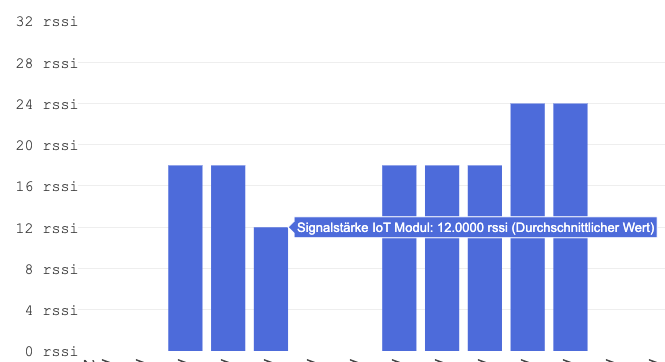
Anything below 20 rssi is not considered too good, however it is only an approximation.
A hard reset means to remove power completely from the device and providing it again after a short time. Here are the steps to do a hard reset.
remove any external power from the module
pry open the enclosure of the module
locate the battery connector
it is normally in a visible place on the PCB red, yellow and black wires leading to it.
disconnect the battery
wait 20-30 seconds
while you wait, you can also make sure that there is a SIM card inside and that is properly fitted into the SIM card slot. You can remove it and insert it back for good measure.
reconnect the battery
close up the enclosure
reconnect external power and additional wires
If your IoT device never sent any data you should double check the wiring. The cause of this issue is often times faulty wiring. You can first make sure that the IoT device is working properly by "simulating" runtime.
Just connect the red and ignition cables to the positive terminal of the battery, and connect the black wire to the negative terminal of the battery. Keep this connection for about 2-3 minutes minimum and check the platform to see if any data appears.
If you still don't see any data after an hour, write us an email at support@toolsense.io or contact us via chat.
If you were unable to find a solution for any of the above mentioned issues, feel free to contact us at support@toolsense.io or write us in the chat.
